> ## Documentation Index
> Fetch the complete documentation index at: https://developers.reflection.ai/llms.txt
> Use this file to discover all available pages before exploring further.
# Coding agent quickstart
> Set up a coding agent with Reflection models and complete a first coding task
export const agent_3 = "Hermes"
export const agent_2 = "OpenCode"
export const agent_1 = "Pi"
export const agent_0 = "Mirror CLI"
This quickstart takes you from an API key to a working coding agent, and ends with a small task that confirms the agent can read files, edit code, and run tests with Reflection models.
The Reflection platform is in beta, and access is opening gradually. New sign-ups join a waitlist and can create API keys once their access is enabled.
For Pi, OpenCode, and Hermes, use these values with an OpenAI-compatible Chat Completions provider:
| Setting | Value |
| - | - |
| Base URL | `https://api.reflection.ai/openai/v1`, the OpenAI-compatible endpoint |
| Model ID | `Beam-501B-A23B` |
| API key | A [Reflection API key](/authentication), read from the `REFLECTION_API_KEY` environment variable |
Mirror's built-in Reflection provider selects its endpoint automatically. Use the [Mirror setup steps](#mirror) to select Reflection and provide your API key.
## Before you start
Sign in to the [Reflection platform](https://platform.reflection.ai), open **API Keys**, and create a key. Export it in the shell you start your agent from, or add the line to your shell profile:
```bash theme={null}
export REFLECTION_API_KEY=""
```
List the models your key can use:
```bash theme={null}
curl https://api.reflection.ai/openai/v1/models \
-H "Authorization: Bearer $REFLECTION_API_KEY"
```
The response lists `Beam-501B-A23B`. If you get a `401` instead, see [Troubleshooting](/coding-agents-quickstart#troubleshooting).
Each guide uses the same first task: fixing a failing test in a small Python project. Create the project now; you need Python 3 and Git.
```bash theme={null}
mkdir stats-demo && cd stats-demo && git init -q
cat > stats.py <<'EOF'
def average(nums):
return sum(nums) / (len(nums) + 1)
EOF
cat > test_stats.py <<'EOF'
import unittest
from stats import average
class TestAverage(unittest.TestCase):
def test_average(self):
self.assertEqual(average([2, 4, 6]), 4)
if __name__ == "__main__":
unittest.main()
EOF
printf '__pycache__/\n' > .gitignore
git add . && git commit -qm "Add stats"
```
`python3 -m unittest` fails with `AssertionError: 3.0 != 4`.
## Set up your agent
Mirror CLI is Reflection's coding agent for the terminal. It uses Reflection and `Beam-501B-A23B` by default, so connecting it takes only an API key.
### Install Mirror CLI
Mirror CLI runs on macOS 15 or later on Apple Silicon, and on Linux with glibc 2.28 or later on x86-64 or ARM64. Git or Jujutsu is needed for worktree management; you can start a session in a plain directory without either. Native Windows isn't supported.
Install Mirror CLI:
```bash theme={null}
curl -fsSL https://raw.githubusercontent.com/reflection-oss/mirror-beta/main/install.sh | bash
```
The installer selects the wheel for your platform, verifies its checksum, installs [uv](https://docs.astral.sh/uv/getting-started/installation/) and Python 3.12 if needed, and updates your shell configuration. To update Mirror, run the installer again.
Open a new terminal after installation, then run `mirror` in your project.
If you already have a Mirror CLI release wheel, install it with uv:
```bash theme={null}
uv tool install --python 3.12 '/path/to/mirror--py3-none-.whl'
```
Don't run `uv tool install mirror`: the [`mirror` package on PyPI](https://pypi.org/project/mirror/) is unrelated. If your shell can't find `mirror` after installing, run `uv tool update-shell` and open a new terminal.
### Connect Mirror CLI to Reflection
Run `mirror` in your project. The first time, Mirror CLI shows a **Using Mirror** notice. In each new directory, it then asks `Continue and trust this folder? [y/N]`; type `y` and press `Enter` to continue.
If you've used Mirror CLI with another provider, run `/model reflection` once it starts. Mirror CLI remembers that choice. `mirror --api reflection --model Beam-501B-A23B` selects Reflection for that launch only.
If `REFLECTION_API_KEY` is set or a saved Reflection key is available, Mirror CLI opens the prompt and you can skip the next step. An environment key takes precedence over the saved key.
Without an environment key or a saved key, Mirror CLI opens a **Connect to Reflection** screen with a link to create one:
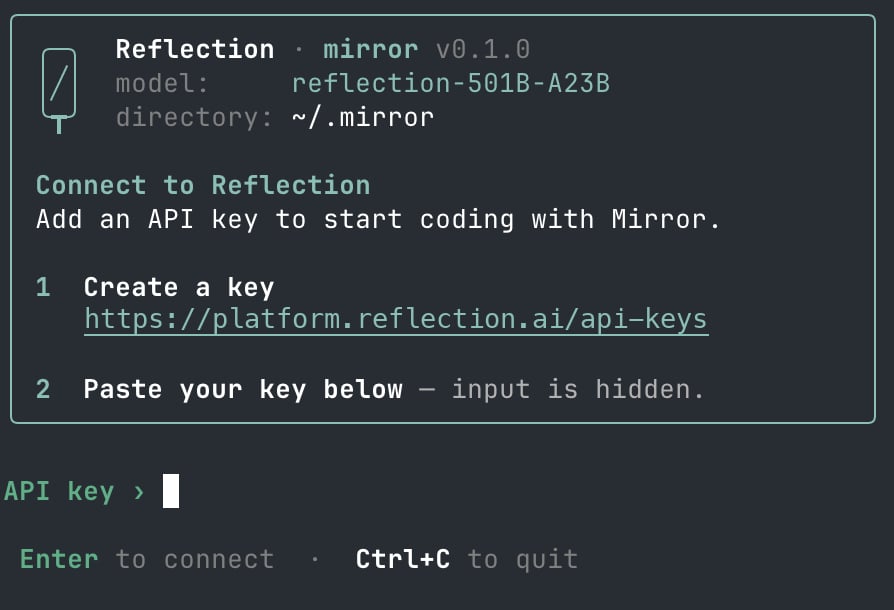 Paste your key at the `API key ›` prompt and press `Enter`. The input is masked, with one `*` for each character. Mirror CLI saves the key to `~/.mirror/reflection_api_key`, readable only by your user, and uses it in later sessions. It doesn't check the key when it saves it; if the key is wrong, requests fail with `401`, and `/logout` removes the saved key so you can paste another. Press `Ctrl+C` to cancel without saving.
`REFLECTION_API_KEY` takes precedence over the saved key. Like other local credentials, the saved key can be read by any command that runs as your user.
The card at the top of the session shows `model: Beam-501B-A23B`.
### Run a first task in Mirror CLI
From the sample project, run `mirror` and enter:
```text theme={null}
Run the tests with python3 -m unittest, find and fix the bug, then run the tests again to confirm they pass.
```
Mirror CLI asks before it runs each tool, including commands that only read files. Press `1` or `Enter` to approve each one. It shows each tool call as it works. Press `Ctrl+C` to exit when it's done.
Review what {agent_0} reports. The intended fix replaces `len(nums) + 1` with `len(nums)` in `stats.py`. Confirm the result yourself:
```bash theme={null}
python3 -m unittest
git diff
```
The expected result is passing tests and this one-line change to `stats.py`:
```diff theme={null}
- return sum(nums) / (len(nums) + 1)
+ return sum(nums) / len(nums)
```
The model can take a different path to the same fix, for example by editing the file with a shell command instead of an edit tool.
### Sessions and permissions in Mirror CLI
* **Start a session.** Run `mirror` in your project. Type `/` to browse commands, or run `mirror --help` for launch options.
* **Resume.** `/resume` picks an earlier conversation, and `/new` starts a fresh one. `mirror --continue` continues recent conversations at startup.
* **Choose the model and reasoning effort.** `/model` switches models, and Mirror CLI remembers the choice. `/reasoning` sets the [reasoning effort](/reasoning); the default is `xhigh`.
* **Work in parallel.** `/worktree [name]` starts an independent task in a checkout of the latest `origin/main`, so the repository needs an `origin` remote. It does not copy your current edits. Switch between worktree tabs with `Tab` and `Shift+Tab`.
* **Permissions.** By default, Mirror CLI asks before it runs each tool, including shell commands that only read files, such as `ls`. Press `1` or `Enter` to approve, or `2` to reject. To approve tool calls automatically, press `F2`, use `/permissions`, or start Mirror CLI with `--approval-mode auto`. Mirror CLI remembers the choice for every directory, in `~/.mirror/config.json`. Tools run locally with your account's permissions; Mirror CLI isn't a sandbox.
See the [Mirror CLI reference](/mirror-cli-reference) for commands, shortcuts, configuration, and feedback.
[Pi](https://pi.dev) is an open-source coding agent for the terminal. These steps were tested with Pi 1.0.3.
### Install Pi
Pi runs on macOS, Linux, and Windows, and needs Node.js 22.19 or later. Install it with npm:
```bash theme={null}
npm install -g --ignore-scripts @earendil-works/pi-coding-agent
```
On macOS and Linux, you can use the install script instead: `curl -fsSL https://pi.dev/install.sh | sh`.
### Connect Pi to Reflection
Save this as `~/.pi/agent/models.json`:
```json ~/.pi/agent/models.json theme={null}
{
"providers": {
"reflection": {
"baseUrl": "https://api.reflection.ai/openai/v1",
"api": "openai-completions",
"apiKey": "$REFLECTION_API_KEY",
"models": [
{
"id": "Beam-501B-A23B",
"reasoning": true,
"contextWindow": 262144,
"maxTokens": 131072,
"thinkingLevelMap": { "off": null, "minimal": null, "xhigh": "xhigh", "max": "max" }
}
]
}
}
}
```
* `"$REFLECTION_API_KEY"` reads the key from your environment, so the key isn't stored in the file. Keep the `$`: without it, Pi sends the text `REFLECTION_API_KEY` as the key.
* `contextWindow` and `maxTokens` set the [context window and max output](/models). Without them, Pi assumes smaller defaults for a model it doesn't know.
* `"reasoning": true` makes Pi send a [reasoning effort](/reasoning) with each request, from its thinking level. `thinkingLevelMap` limits Pi's thinking levels to the ones the API accepts: `low`, `medium`, `high`, `xhigh`, and `max`. With this map, Pi sends `low` for its `off` and `minimal` levels.
Save this as `~/.pi/agent/settings.json`, or add the keys to your existing settings:
```json ~/.pi/agent/settings.json theme={null}
{
"defaultProvider": "reflection",
"defaultModel": "Beam-501B-A23B",
"defaultThinkingLevel": "high"
}
```
To skip this step, start Pi with `pi --model reflection/Beam-501B-A23B` instead.
```bash theme={null}
pi --list-models reflection
```
The list includes `Beam-501B-A23B`. If Pi prints `No models available`, `REFLECTION_API_KEY` isn't set in this shell; export it and run the command again.
### Run a first task in Pi
From the sample project, run:
```bash theme={null}
pi -p "Run the tests with python3 -m unittest, find and fix the bug, then run the tests again to confirm they pass."
```
`-p` runs one prompt, prints the final answer, and exits.
Review what {agent_1} reports. The intended fix replaces `len(nums) + 1` with `len(nums)` in `stats.py`. Confirm the result yourself:
```bash theme={null}
python3 -m unittest
git diff
```
The expected result is passing tests and this one-line change to `stats.py`:
```diff theme={null}
- return sum(nums) / (len(nums) + 1)
+ return sum(nums) / len(nums)
```
The model can take a different path to the same fix, for example by editing the file with a shell command instead of an edit tool.
### Sessions and permissions in Pi
* **Start a session.** Run `pi` in your project to open the interactive interface. The first interactive start downloads `fd` and `ripgrep` into `~/.pi/agent/bin`. `pi -p ""` runs one prompt and exits.
* **Resume.** `pi -c` continues the most recent session in the current directory, or starts a new one without notice if there isn't one. `pi -r` or `/resume` picks an earlier session, and `/new` starts a fresh one.
* **Choose the model and thinking level.** `/model` switches models. `/thinking` or `--thinking low|medium|high|xhigh|max` sets the reasoning effort.
* **Stop.** Press `Esc` to stop the current task, or `Ctrl+C` twice to exit.
* **Permissions.** Pi doesn't ask for approval before it runs a tool. Limit the tools it can use with `--tools`, for example `--tools read,grep`, or run it in a container or VM. See Pi's [security notes](https://github.com/earendil-works/pi/blob/main/packages/coding-agent/docs/security.md).
### Known issues with Pi
* The model sometimes calls a Pi tool without its required arguments, for example `edit` without `path`. Pi rejects the call and the model retries. Tasks still complete, but can take longer.
* In scripts, `pi -p` can wait for input when standard input is an open pipe. Redirect it: `pi -p ""
[OpenCode](https://opencode.ai) is an open-source coding agent for the terminal. These steps were tested with OpenCode 1.18.34.
### Install OpenCode
OpenCode runs on macOS and Linux, and on Windows through WSL. Install it with any of the [upstream methods](https://opencode.ai/docs/#install):
```bash Install script theme={null}
curl -fsSL https://opencode.ai/install | bash
```
```bash npm theme={null}
npm install -g opencode-ai
```
```bash Homebrew theme={null}
brew install anomalyco/tap/opencode
```
The install script adds `~/.opencode/bin` to `PATH` in your shell profile. If it prints `No config file found`, add that directory to `PATH` yourself. Open a new terminal, then run `opencode --version` to confirm the install.
Recent npm versions can warn that the `opencode-ai` postinstall script was skipped. The install still works; `opencode --version` confirms it.
### Connect OpenCode to Reflection
Save this as `opencode.json` in your project root, or as `~/.config/opencode/opencode.json` to use it in every project:
```json opencode.json theme={null}
{
"$schema": "https://opencode.ai/config.json",
"provider": {
"reflection": {
"npm": "@ai-sdk/openai-compatible",
"name": "Reflection",
"options": {
"baseURL": "https://api.reflection.ai/openai/v1",
"apiKey": "{env:REFLECTION_API_KEY}"
},
"models": {
"Beam-501B-A23B": {
"name": "Beam-501B-A23B",
"modalities": {
"input": ["text"],
"output": ["text"]
},
"limit": {
"context": 262144,
"output": 131072
},
"reasoning": true,
"interleaved": {
"field": "reasoning_content"
},
"variants": {
"xhigh": {
"reasoningEffort": "xhigh"
},
"max": {
"reasoningEffort": "max"
}
}
}
}
}
},
"model": "reflection/Beam-501B-A23B"
}
```
`{env:REFLECTION_API_KEY}` reads the key from your environment when OpenCode starts, so the key isn't stored in the file. `model` makes Reflection the default; without it, OpenCode can start on another provider's model.
OpenCode doesn't read model details from the API, so the model entry describes Beam:
* `modalities` declares the model as text-only, because the API accepts [text input only](/openai-compatibility#input). When you attach an image or PDF, or a tool reads one, OpenCode sends the model a note that it can't read the file instead of the file itself.
* `limit` sets the [context window and max output](/models). OpenCode compacts a session when it nears the context window; without `limit`, it never compacts. OpenCode caps each request's output at 32,000 tokens regardless of `limit.output`; to raise the cap, set `OPENCODE_EXPERIMENTAL_OUTPUT_TOKEN_MAX=131072` in your environment.
* `reasoning` lets you choose a [reasoning effort](/reasoning). OpenCode offers `low`, `medium`, and `high`, and `variants` adds `xhigh` and `max`.
* `interleaved` names `reasoning_content` as the field that carries the model's reasoning. OpenCode sends earlier reasoning back in [multi-turn conversations](/reasoning#reasoning-in-multi-turn-conversations) and tool calls with or without it.
```bash theme={null}
opencode models reflection
```
The output is `reflection/Beam-501B-A23B`.
### Run a first task in OpenCode
From the sample project, run:
```bash theme={null}
opencode run "Run the tests with python3 -m unittest, find and fix the bug, then run the tests again to confirm they pass."
```
The output starts with `> build · Beam-501B-A23B`, which confirms the model in use.
Review what {agent_2} reports. The intended fix replaces `len(nums) + 1` with `len(nums)` in `stats.py`. Confirm the result yourself:
```bash theme={null}
python3 -m unittest
git diff
```
The expected result is passing tests and this one-line change to `stats.py`:
```diff theme={null}
- return sum(nums) / (len(nums) + 1)
+ return sum(nums) / len(nums)
```
The model can take a different path to the same fix, for example by editing the file with a shell command instead of an edit tool.
### Sessions and permissions in OpenCode
* **Start a session.** Run `opencode` in your project to open the interactive interface. `opencode run ""` runs one prompt and exits.
* **Resume.** In the interface, `/sessions` lists earlier sessions and `/new` starts a fresh one. From the command line, `opencode run -c ""` continues the last session, and `-s ` continues a specific one.
* **Choose the model.** `/models` switches models in the interface; `-m reflection/Beam-501B-A23B` sets it for one run.
* **Choose a reasoning effort.** Press `Ctrl+T` in the interface to cycle through `low`, `medium`, `high`, `xhigh`, and `max`, or add `--variant high` to `opencode run`. Without a variant, the model uses its default effort, `medium`.
* **Show reasoning.** The model's reasoning is kept with the session. Add `--thinking` to `opencode run` to print it.
* **Stop.** Press `Esc` twice to interrupt the current response, and use `/exit` to quit.
* **Permissions.** OpenCode allows most tool calls by default. To require approval in the interactive interface, add a `permission` block to `opencode.json`, for example `"permission": { "bash": "ask", "edit": "ask" }`. `opencode run` can't prompt, so it rejects any tool call set to `ask` and ends the run with exit status `0`. By default, reading files outside the project directory also asks, so `opencode run` rejects it; add `--auto` to approve everything that isn't set to `deny`. Denying `edit` alone doesn't stop file changes through `bash`, so restrict `bash` too, or run OpenCode in a container. See [Permissions](https://opencode.ai/docs/permissions/).
### Known issues with OpenCode
* OpenCode lists models from other providers, including free OpenCode Zen models even with no other API keys set. Without `"model"` in the config, the interface can start on one of them, so keep `"model"` and check that `opencode run` output names `Beam-501B-A23B`.
* In scripts, `opencode run` waits for standard input to close when it's an open pipe. Redirect it: `opencode run ""
[Hermes Agent](https://github.com/NousResearch/hermes-agent) is an open-source agent by Nous Research that runs in the terminal. These steps were tested with Hermes Agent v0.21.5; the install script installs the latest development version, which can be newer.
### Install Hermes Agent
Hermes Agent runs on macOS, Linux, and WSL2, and upstream also provides a native Windows installer. Install it with the upstream script:
```bash macOS, Linux, WSL2 theme={null}
curl -fsSL https://hermes-agent.nousresearch.com/install.sh | bash -s -- --skip-setup
```
```powershell Windows theme={null}
iex (irm https://hermes-agent.nousresearch.com/install.ps1)
```
The script installs its own Python, Node.js, and other tools (about 2.4 GB) and adds `hermes` to your `PATH` in your shell profile files. `--skip-setup` skips the `hermes setup` wizard, whose default choice signs in to a different provider, and the background gateway service that the script otherwise installs and starts on macOS without asking. The next step configures the model. Open a new terminal, or `source` your shell profile, so that `hermes` is on your `PATH`.
The Windows installer starts the `hermes setup` wizard; press `Ctrl+C` to exit it. If you installed without `--skip-setup` on macOS, run `hermes gateway uninstall` to remove the background service.
### Connect Hermes to Reflection
```bash theme={null}
hermes config set model.provider custom
hermes config set model.base_url https://api.reflection.ai/openai/v1
hermes config set model.default Beam-501B-A23B
hermes config set model.key_env REFLECTION_API_KEY
hermes config set model.reasoning_echo true
hermes config set auxiliary.title_generation.model_upgrade_enabled false
hermes config set auth.adopt_external_logins false
```
These update `~/.hermes/config.yaml` in place. The installer creates that file with many other settings, including a `model` section, so use the commands rather than pasting these keys into it. A second `model` section makes the file invalid, and Hermes then ignores all of your settings. After the commands, the file contains:
```yaml ~/.hermes/config.yaml theme={null}
model:
provider: custom
default: Beam-501B-A23B
base_url: https://api.reflection.ai/openai/v1
key_env: REFLECTION_API_KEY
reasoning_echo: true
auxiliary:
title_generation:
model_upgrade_enabled: false
auth:
adopt_external_logins: false
```
`key_env` makes Hermes read the key from `REFLECTION_API_KEY` at startup, so the key isn't stored in the file. Hermes ignores `OPENAI_BASE_URL` for a custom provider, so set the base URL here.
`reasoning_echo` is required. It makes Hermes send each earlier assistant turn back with its `reasoning_content`, as described in [Reasoning](/reasoning#reasoning-in-multi-turn-conversations). Hermes drops that reasoning for a custom provider by default, and then the second request of every task that calls a tool fails with `400 missing_required_parameter` and `Missing required parameter: 'messages[2].reasoning_content'`. Hermes suggests `/model` or `/new`, which don't fix it. See [Troubleshooting](/coding-agents-quickstart#troubleshooting-reasoning-content).
`model_upgrade_enabled: false` names each session with text from your messages instead of a separate model request. Hermes sends that request with reasoning turned off, and `Beam-501B-A23B` always reasons, so it rejects the request, as described in [Reasoning](/reasoning#set-reasoning-effort). Hermes then retries, but a one-shot run often exits before the retry finishes and prints `Auxiliary title generation failed: Connection error.`
`adopt_external_logins: false` stops Hermes from reading sign-ins from other coding tools installed on your machine, so it uses only your Reflection key. With the default, `true`, each interactive start on macOS reads the `Claude Code-credentials` Keychain item, and Hermes can also read the Codex CLI login.
```bash theme={null}
hermes chat --oneshot -q "Reply with exactly: pong"
```
Hermes shows the model's reasoning, then replies `pong`.
### Run a first task in Hermes
From the sample project, run:
```bash theme={null}
hermes chat --oneshot -q "Read this repository, run the tests with python3 -m unittest, find and fix the bug, then run the tests again to confirm they pass."
```
Hermes shows each tool call and an inline diff of its edit as it works.
Review what {agent_3} reports. The intended fix replaces `len(nums) + 1` with `len(nums)` in `stats.py`. Confirm the result yourself:
```bash theme={null}
python3 -m unittest
git diff
```
The expected result is passing tests and this one-line change to `stats.py`:
```diff theme={null}
- return sum(nums) / (len(nums) + 1)
+ return sum(nums) / len(nums)
```
The model can take a different path to the same fix, for example by editing the file with a shell command instead of an edit tool.
### Sessions and permissions in Hermes
* **Start a session.** Run `hermes` to open the interactive interface. `hermes chat --oneshot -q ""` runs one prompt and exits. Without `--oneshot`, `-q` in a terminal starts an interactive session with that prompt.
* **Resume.** Hermes prints resume commands when a session ends, such as `hermes -c ""`. `hermes --resume latest` continues the last session, and `hermes --resume ` continues a specific one.
* **Stop.** Press `Ctrl+C` to interrupt the current turn. At an idle prompt, `Ctrl+C` clears your draft, or exits if the draft is empty. `/stop` doesn't stop the turn; it stops background processes that the agent started. `/quit` exits.
* **Show reasoning.** Hermes shows the model's reasoning by default. Use `/reasoning hide` to turn it off and `/reasoning show` to turn it back on; Hermes saves the setting in `config.yaml`.
* **Approvals.** Hermes asks before running commands it considers risky. `approvals.mode` in `config.yaml` sets this to `smart` (the default), `manual`, or `off`. In `smart` mode, a model request decides whether to approve a flagged command, block it, or ask you, so flagged commands can run without asking, including destructive ones such as `rm -rf .git`. To review every flagged command yourself, run `hermes config set approvals.mode manual`. One-shot runs, with `--oneshot` or outside a terminal, deny risky commands instead of asking, but this isn't a sandbox: the model can reach the same result another way, for example by writing and running a script. See the [Hermes Agent documentation](https://hermes-agent.nousresearch.com/docs) for details.
### Known issues with Hermes
* Hermes uses a secondary model for tasks such as risk scoring for approvals and summarizing long conversations. By default it uses your main model, so these requests also go to Reflection.
* Background review is on by default. Every 10 turns by default, Hermes sends the conversation to the model again in the background and can save skills and memories from it. To turn it off, run `hermes config set auxiliary.background_review.enabled false`.
* Requests that include an image, such as Hermes's image analysis, fail with `400 invalid_value`, because the API accepts [text input only](/openai-compatibility#input).
* If Hermes prints `Auxiliary title generation failed`, check that `hermes config get auxiliary.title_generation.model_upgrade_enabled` prints `false`. The warning doesn't affect the task.
* Occasionally a turn ends with raw tool-call text in place of an answer, and the requested change isn't made. Check `git diff`, and run the prompt again.
* On first use, Hermes downloads some of its own tools, such as a command scanner and language servers. This needs access to GitHub, PyPI, and npm, but doesn't send your conversation anywhere. At startup, Hermes also contacts `models.dev`, `hermes-agent.nousresearch.com`, and `nousresearch.github.io`.
## Limits
* For Pi, OpenCode, and Hermes, configure an OpenAI-compatible Chat Completions provider. The public API supports Chat Completions and Models, not the OpenAI Responses API. Mirror uses its built-in Reflection provider. See [OpenAI compatibility](/openai-compatibility).
* Coding agents can send many model requests while completing a task. These count toward your organization's [rate limits](/rate-limits) like any other request.
## Troubleshooting
The API key is missing, malformed, or not valid. Check that `REFLECTION_API_KEY` is exported in the shell you started the agent from: run the [key check](#check-the-key) in that shell. If you added the export to your shell profile, open a new terminal or `source` the profile. See [Authentication](/authentication).
If Mirror uses a saved key that's wrong, run `/logout` and paste a new key. If Pi prints `No models available` or `No API key found`, or OpenCode prints `Provide an API key or Playground credential in the Authorization header`, `REFLECTION_API_KEY` isn't set in that shell. OpenCode reports a wrong key as `Incorrect API key provided`, without the status code. Hermes shows the same message when the key is unset, and suggests `hermes setup`; ignore that, because the [Hermes guide](#hermes) reads the key through `key_env` instead. `~/.hermes/logs/errors.log` says when `REFLECTION_API_KEY` is empty or unset.
* Check that the model ID is exactly `Beam-501B-A23B`, including capitalization. OpenCode reports a wrong ID as `The model [] you requested is unavailable`.
* In Pi, OpenCode, or Hermes, check that the base URL is `https://api.reflection.ai/openai/v1`, ending in `/openai/v1` with no trailing path such as `/chat/completions`. The agent adds that path itself. With a trailing path, OpenCode prints `Not Found: 404 page not found`.
* In Mirror, run `/model` and select **Reflection API**, its built-in Reflection provider, or run `/model reflection`. You do not set a base URL for that provider.
A rate limit was exceeded. Wait and retry the task, or run fewer agent sessions at once. See [Rate limits](/rate-limits).
Reasoning on a large task can take a while before the first output appears. If requests fail with `502` or `503`, or time out repeatedly, retry the task. See [Errors](/errors#retrying).
Every request in a session fails with `400 missing_required_parameter`:
```text theme={null}
Missing required parameter: 'messages[N].reasoning_content'. This model needs the reasoning of every earlier assistant message: send back the 'reasoning_content' returned with that message.
```
The model sometimes returns a tool-call step without reasoning. An agent that sends that step back without `reasoning_content` gets this error on every later request in the session. Start a new session: `/new` in Mirror or Pi, or `opencode run` without `-c` in OpenCode. In Hermes, check that `hermes config get model.reasoning_echo` prints `true`.
* Check the model name the agent prints when it starts.
* In Mirror, use `/model reflection` to change the saved model selection. Launching with `mirror --api reflection --model Beam-501B-A23B` uses it for that launch only.
* In Pi, OpenCode, or Hermes, check the default provider and model in the configuration shown in its guide.
## Share feedback
For Mirror CLI, run `/feedback` to open the GitHub feedback form. Review your report before submitting; no session data or diagnostics are attached automatically. See [reporting a bug](/mirror-cli-reference#report-a-bug).
If a guide on this page doesn't work for you, keep a note of the agent and its version, your operating system, the command you ran, and the error message. Leave out your API key.
Paste your key at the `API key ›` prompt and press `Enter`. The input is masked, with one `*` for each character. Mirror CLI saves the key to `~/.mirror/reflection_api_key`, readable only by your user, and uses it in later sessions. It doesn't check the key when it saves it; if the key is wrong, requests fail with `401`, and `/logout` removes the saved key so you can paste another. Press `Ctrl+C` to cancel without saving.
`REFLECTION_API_KEY` takes precedence over the saved key. Like other local credentials, the saved key can be read by any command that runs as your user.
The card at the top of the session shows `model: Beam-501B-A23B`.
### Run a first task in Mirror CLI
From the sample project, run `mirror` and enter:
```text theme={null}
Run the tests with python3 -m unittest, find and fix the bug, then run the tests again to confirm they pass.
```
Mirror CLI asks before it runs each tool, including commands that only read files. Press `1` or `Enter` to approve each one. It shows each tool call as it works. Press `Ctrl+C` to exit when it's done.
Review what {agent_0} reports. The intended fix replaces `len(nums) + 1` with `len(nums)` in `stats.py`. Confirm the result yourself:
```bash theme={null}
python3 -m unittest
git diff
```
The expected result is passing tests and this one-line change to `stats.py`:
```diff theme={null}
- return sum(nums) / (len(nums) + 1)
+ return sum(nums) / len(nums)
```
The model can take a different path to the same fix, for example by editing the file with a shell command instead of an edit tool.
### Sessions and permissions in Mirror CLI
* **Start a session.** Run `mirror` in your project. Type `/` to browse commands, or run `mirror --help` for launch options.
* **Resume.** `/resume` picks an earlier conversation, and `/new` starts a fresh one. `mirror --continue` continues recent conversations at startup.
* **Choose the model and reasoning effort.** `/model` switches models, and Mirror CLI remembers the choice. `/reasoning` sets the [reasoning effort](/reasoning); the default is `xhigh`.
* **Work in parallel.** `/worktree [name]` starts an independent task in a checkout of the latest `origin/main`, so the repository needs an `origin` remote. It does not copy your current edits. Switch between worktree tabs with `Tab` and `Shift+Tab`.
* **Permissions.** By default, Mirror CLI asks before it runs each tool, including shell commands that only read files, such as `ls`. Press `1` or `Enter` to approve, or `2` to reject. To approve tool calls automatically, press `F2`, use `/permissions`, or start Mirror CLI with `--approval-mode auto`. Mirror CLI remembers the choice for every directory, in `~/.mirror/config.json`. Tools run locally with your account's permissions; Mirror CLI isn't a sandbox.
See the [Mirror CLI reference](/mirror-cli-reference) for commands, shortcuts, configuration, and feedback.
[Pi](https://pi.dev) is an open-source coding agent for the terminal. These steps were tested with Pi 1.0.3.
### Install Pi
Pi runs on macOS, Linux, and Windows, and needs Node.js 22.19 or later. Install it with npm:
```bash theme={null}
npm install -g --ignore-scripts @earendil-works/pi-coding-agent
```
On macOS and Linux, you can use the install script instead: `curl -fsSL https://pi.dev/install.sh | sh`.
### Connect Pi to Reflection
Save this as `~/.pi/agent/models.json`:
```json ~/.pi/agent/models.json theme={null}
{
"providers": {
"reflection": {
"baseUrl": "https://api.reflection.ai/openai/v1",
"api": "openai-completions",
"apiKey": "$REFLECTION_API_KEY",
"models": [
{
"id": "Beam-501B-A23B",
"reasoning": true,
"contextWindow": 262144,
"maxTokens": 131072,
"thinkingLevelMap": { "off": null, "minimal": null, "xhigh": "xhigh", "max": "max" }
}
]
}
}
}
```
* `"$REFLECTION_API_KEY"` reads the key from your environment, so the key isn't stored in the file. Keep the `$`: without it, Pi sends the text `REFLECTION_API_KEY` as the key.
* `contextWindow` and `maxTokens` set the [context window and max output](/models). Without them, Pi assumes smaller defaults for a model it doesn't know.
* `"reasoning": true` makes Pi send a [reasoning effort](/reasoning) with each request, from its thinking level. `thinkingLevelMap` limits Pi's thinking levels to the ones the API accepts: `low`, `medium`, `high`, `xhigh`, and `max`. With this map, Pi sends `low` for its `off` and `minimal` levels.
Save this as `~/.pi/agent/settings.json`, or add the keys to your existing settings:
```json ~/.pi/agent/settings.json theme={null}
{
"defaultProvider": "reflection",
"defaultModel": "Beam-501B-A23B",
"defaultThinkingLevel": "high"
}
```
To skip this step, start Pi with `pi --model reflection/Beam-501B-A23B` instead.
```bash theme={null}
pi --list-models reflection
```
The list includes `Beam-501B-A23B`. If Pi prints `No models available`, `REFLECTION_API_KEY` isn't set in this shell; export it and run the command again.
### Run a first task in Pi
From the sample project, run:
```bash theme={null}
pi -p "Run the tests with python3 -m unittest, find and fix the bug, then run the tests again to confirm they pass."
```
`-p` runs one prompt, prints the final answer, and exits.
Review what {agent_1} reports. The intended fix replaces `len(nums) + 1` with `len(nums)` in `stats.py`. Confirm the result yourself:
```bash theme={null}
python3 -m unittest
git diff
```
The expected result is passing tests and this one-line change to `stats.py`:
```diff theme={null}
- return sum(nums) / (len(nums) + 1)
+ return sum(nums) / len(nums)
```
The model can take a different path to the same fix, for example by editing the file with a shell command instead of an edit tool.
### Sessions and permissions in Pi
* **Start a session.** Run `pi` in your project to open the interactive interface. The first interactive start downloads `fd` and `ripgrep` into `~/.pi/agent/bin`. `pi -p ""` runs one prompt and exits.
* **Resume.** `pi -c` continues the most recent session in the current directory, or starts a new one without notice if there isn't one. `pi -r` or `/resume` picks an earlier session, and `/new` starts a fresh one.
* **Choose the model and thinking level.** `/model` switches models. `/thinking` or `--thinking low|medium|high|xhigh|max` sets the reasoning effort.
* **Stop.** Press `Esc` to stop the current task, or `Ctrl+C` twice to exit.
* **Permissions.** Pi doesn't ask for approval before it runs a tool. Limit the tools it can use with `--tools`, for example `--tools read,grep`, or run it in a container or VM. See Pi's [security notes](https://github.com/earendil-works/pi/blob/main/packages/coding-agent/docs/security.md).
### Known issues with Pi
* The model sometimes calls a Pi tool without its required arguments, for example `edit` without `path`. Pi rejects the call and the model retries. Tasks still complete, but can take longer.
* In scripts, `pi -p` can wait for input when standard input is an open pipe. Redirect it: `pi -p ""
[OpenCode](https://opencode.ai) is an open-source coding agent for the terminal. These steps were tested with OpenCode 1.18.34.
### Install OpenCode
OpenCode runs on macOS and Linux, and on Windows through WSL. Install it with any of the [upstream methods](https://opencode.ai/docs/#install):
```bash Install script theme={null}
curl -fsSL https://opencode.ai/install | bash
```
```bash npm theme={null}
npm install -g opencode-ai
```
```bash Homebrew theme={null}
brew install anomalyco/tap/opencode
```
The install script adds `~/.opencode/bin` to `PATH` in your shell profile. If it prints `No config file found`, add that directory to `PATH` yourself. Open a new terminal, then run `opencode --version` to confirm the install.
Recent npm versions can warn that the `opencode-ai` postinstall script was skipped. The install still works; `opencode --version` confirms it.
### Connect OpenCode to Reflection
Save this as `opencode.json` in your project root, or as `~/.config/opencode/opencode.json` to use it in every project:
```json opencode.json theme={null}
{
"$schema": "https://opencode.ai/config.json",
"provider": {
"reflection": {
"npm": "@ai-sdk/openai-compatible",
"name": "Reflection",
"options": {
"baseURL": "https://api.reflection.ai/openai/v1",
"apiKey": "{env:REFLECTION_API_KEY}"
},
"models": {
"Beam-501B-A23B": {
"name": "Beam-501B-A23B",
"modalities": {
"input": ["text"],
"output": ["text"]
},
"limit": {
"context": 262144,
"output": 131072
},
"reasoning": true,
"interleaved": {
"field": "reasoning_content"
},
"variants": {
"xhigh": {
"reasoningEffort": "xhigh"
},
"max": {
"reasoningEffort": "max"
}
}
}
}
}
},
"model": "reflection/Beam-501B-A23B"
}
```
`{env:REFLECTION_API_KEY}` reads the key from your environment when OpenCode starts, so the key isn't stored in the file. `model` makes Reflection the default; without it, OpenCode can start on another provider's model.
OpenCode doesn't read model details from the API, so the model entry describes Beam:
* `modalities` declares the model as text-only, because the API accepts [text input only](/openai-compatibility#input). When you attach an image or PDF, or a tool reads one, OpenCode sends the model a note that it can't read the file instead of the file itself.
* `limit` sets the [context window and max output](/models). OpenCode compacts a session when it nears the context window; without `limit`, it never compacts. OpenCode caps each request's output at 32,000 tokens regardless of `limit.output`; to raise the cap, set `OPENCODE_EXPERIMENTAL_OUTPUT_TOKEN_MAX=131072` in your environment.
* `reasoning` lets you choose a [reasoning effort](/reasoning). OpenCode offers `low`, `medium`, and `high`, and `variants` adds `xhigh` and `max`.
* `interleaved` names `reasoning_content` as the field that carries the model's reasoning. OpenCode sends earlier reasoning back in [multi-turn conversations](/reasoning#reasoning-in-multi-turn-conversations) and tool calls with or without it.
```bash theme={null}
opencode models reflection
```
The output is `reflection/Beam-501B-A23B`.
### Run a first task in OpenCode
From the sample project, run:
```bash theme={null}
opencode run "Run the tests with python3 -m unittest, find and fix the bug, then run the tests again to confirm they pass."
```
The output starts with `> build · Beam-501B-A23B`, which confirms the model in use.
Review what {agent_2} reports. The intended fix replaces `len(nums) + 1` with `len(nums)` in `stats.py`. Confirm the result yourself:
```bash theme={null}
python3 -m unittest
git diff
```
The expected result is passing tests and this one-line change to `stats.py`:
```diff theme={null}
- return sum(nums) / (len(nums) + 1)
+ return sum(nums) / len(nums)
```
The model can take a different path to the same fix, for example by editing the file with a shell command instead of an edit tool.
### Sessions and permissions in OpenCode
* **Start a session.** Run `opencode` in your project to open the interactive interface. `opencode run ""` runs one prompt and exits.
* **Resume.** In the interface, `/sessions` lists earlier sessions and `/new` starts a fresh one. From the command line, `opencode run -c ""` continues the last session, and `-s ` continues a specific one.
* **Choose the model.** `/models` switches models in the interface; `-m reflection/Beam-501B-A23B` sets it for one run.
* **Choose a reasoning effort.** Press `Ctrl+T` in the interface to cycle through `low`, `medium`, `high`, `xhigh`, and `max`, or add `--variant high` to `opencode run`. Without a variant, the model uses its default effort, `medium`.
* **Show reasoning.** The model's reasoning is kept with the session. Add `--thinking` to `opencode run` to print it.
* **Stop.** Press `Esc` twice to interrupt the current response, and use `/exit` to quit.
* **Permissions.** OpenCode allows most tool calls by default. To require approval in the interactive interface, add a `permission` block to `opencode.json`, for example `"permission": { "bash": "ask", "edit": "ask" }`. `opencode run` can't prompt, so it rejects any tool call set to `ask` and ends the run with exit status `0`. By default, reading files outside the project directory also asks, so `opencode run` rejects it; add `--auto` to approve everything that isn't set to `deny`. Denying `edit` alone doesn't stop file changes through `bash`, so restrict `bash` too, or run OpenCode in a container. See [Permissions](https://opencode.ai/docs/permissions/).
### Known issues with OpenCode
* OpenCode lists models from other providers, including free OpenCode Zen models even with no other API keys set. Without `"model"` in the config, the interface can start on one of them, so keep `"model"` and check that `opencode run` output names `Beam-501B-A23B`.
* In scripts, `opencode run` waits for standard input to close when it's an open pipe. Redirect it: `opencode run ""
[Hermes Agent](https://github.com/NousResearch/hermes-agent) is an open-source agent by Nous Research that runs in the terminal. These steps were tested with Hermes Agent v0.21.5; the install script installs the latest development version, which can be newer.
### Install Hermes Agent
Hermes Agent runs on macOS, Linux, and WSL2, and upstream also provides a native Windows installer. Install it with the upstream script:
```bash macOS, Linux, WSL2 theme={null}
curl -fsSL https://hermes-agent.nousresearch.com/install.sh | bash -s -- --skip-setup
```
```powershell Windows theme={null}
iex (irm https://hermes-agent.nousresearch.com/install.ps1)
```
The script installs its own Python, Node.js, and other tools (about 2.4 GB) and adds `hermes` to your `PATH` in your shell profile files. `--skip-setup` skips the `hermes setup` wizard, whose default choice signs in to a different provider, and the background gateway service that the script otherwise installs and starts on macOS without asking. The next step configures the model. Open a new terminal, or `source` your shell profile, so that `hermes` is on your `PATH`.
The Windows installer starts the `hermes setup` wizard; press `Ctrl+C` to exit it. If you installed without `--skip-setup` on macOS, run `hermes gateway uninstall` to remove the background service.
### Connect Hermes to Reflection
```bash theme={null}
hermes config set model.provider custom
hermes config set model.base_url https://api.reflection.ai/openai/v1
hermes config set model.default Beam-501B-A23B
hermes config set model.key_env REFLECTION_API_KEY
hermes config set model.reasoning_echo true
hermes config set auxiliary.title_generation.model_upgrade_enabled false
hermes config set auth.adopt_external_logins false
```
These update `~/.hermes/config.yaml` in place. The installer creates that file with many other settings, including a `model` section, so use the commands rather than pasting these keys into it. A second `model` section makes the file invalid, and Hermes then ignores all of your settings. After the commands, the file contains:
```yaml ~/.hermes/config.yaml theme={null}
model:
provider: custom
default: Beam-501B-A23B
base_url: https://api.reflection.ai/openai/v1
key_env: REFLECTION_API_KEY
reasoning_echo: true
auxiliary:
title_generation:
model_upgrade_enabled: false
auth:
adopt_external_logins: false
```
`key_env` makes Hermes read the key from `REFLECTION_API_KEY` at startup, so the key isn't stored in the file. Hermes ignores `OPENAI_BASE_URL` for a custom provider, so set the base URL here.
`reasoning_echo` is required. It makes Hermes send each earlier assistant turn back with its `reasoning_content`, as described in [Reasoning](/reasoning#reasoning-in-multi-turn-conversations). Hermes drops that reasoning for a custom provider by default, and then the second request of every task that calls a tool fails with `400 missing_required_parameter` and `Missing required parameter: 'messages[2].reasoning_content'`. Hermes suggests `/model` or `/new`, which don't fix it. See [Troubleshooting](/coding-agents-quickstart#troubleshooting-reasoning-content).
`model_upgrade_enabled: false` names each session with text from your messages instead of a separate model request. Hermes sends that request with reasoning turned off, and `Beam-501B-A23B` always reasons, so it rejects the request, as described in [Reasoning](/reasoning#set-reasoning-effort). Hermes then retries, but a one-shot run often exits before the retry finishes and prints `Auxiliary title generation failed: Connection error.`
`adopt_external_logins: false` stops Hermes from reading sign-ins from other coding tools installed on your machine, so it uses only your Reflection key. With the default, `true`, each interactive start on macOS reads the `Claude Code-credentials` Keychain item, and Hermes can also read the Codex CLI login.
```bash theme={null}
hermes chat --oneshot -q "Reply with exactly: pong"
```
Hermes shows the model's reasoning, then replies `pong`.
### Run a first task in Hermes
From the sample project, run:
```bash theme={null}
hermes chat --oneshot -q "Read this repository, run the tests with python3 -m unittest, find and fix the bug, then run the tests again to confirm they pass."
```
Hermes shows each tool call and an inline diff of its edit as it works.
Review what {agent_3} reports. The intended fix replaces `len(nums) + 1` with `len(nums)` in `stats.py`. Confirm the result yourself:
```bash theme={null}
python3 -m unittest
git diff
```
The expected result is passing tests and this one-line change to `stats.py`:
```diff theme={null}
- return sum(nums) / (len(nums) + 1)
+ return sum(nums) / len(nums)
```
The model can take a different path to the same fix, for example by editing the file with a shell command instead of an edit tool.
### Sessions and permissions in Hermes
* **Start a session.** Run `hermes` to open the interactive interface. `hermes chat --oneshot -q ""` runs one prompt and exits. Without `--oneshot`, `-q` in a terminal starts an interactive session with that prompt.
* **Resume.** Hermes prints resume commands when a session ends, such as `hermes -c ""`. `hermes --resume latest` continues the last session, and `hermes --resume ` continues a specific one.
* **Stop.** Press `Ctrl+C` to interrupt the current turn. At an idle prompt, `Ctrl+C` clears your draft, or exits if the draft is empty. `/stop` doesn't stop the turn; it stops background processes that the agent started. `/quit` exits.
* **Show reasoning.** Hermes shows the model's reasoning by default. Use `/reasoning hide` to turn it off and `/reasoning show` to turn it back on; Hermes saves the setting in `config.yaml`.
* **Approvals.** Hermes asks before running commands it considers risky. `approvals.mode` in `config.yaml` sets this to `smart` (the default), `manual`, or `off`. In `smart` mode, a model request decides whether to approve a flagged command, block it, or ask you, so flagged commands can run without asking, including destructive ones such as `rm -rf .git`. To review every flagged command yourself, run `hermes config set approvals.mode manual`. One-shot runs, with `--oneshot` or outside a terminal, deny risky commands instead of asking, but this isn't a sandbox: the model can reach the same result another way, for example by writing and running a script. See the [Hermes Agent documentation](https://hermes-agent.nousresearch.com/docs) for details.
### Known issues with Hermes
* Hermes uses a secondary model for tasks such as risk scoring for approvals and summarizing long conversations. By default it uses your main model, so these requests also go to Reflection.
* Background review is on by default. Every 10 turns by default, Hermes sends the conversation to the model again in the background and can save skills and memories from it. To turn it off, run `hermes config set auxiliary.background_review.enabled false`.
* Requests that include an image, such as Hermes's image analysis, fail with `400 invalid_value`, because the API accepts [text input only](/openai-compatibility#input).
* If Hermes prints `Auxiliary title generation failed`, check that `hermes config get auxiliary.title_generation.model_upgrade_enabled` prints `false`. The warning doesn't affect the task.
* Occasionally a turn ends with raw tool-call text in place of an answer, and the requested change isn't made. Check `git diff`, and run the prompt again.
* On first use, Hermes downloads some of its own tools, such as a command scanner and language servers. This needs access to GitHub, PyPI, and npm, but doesn't send your conversation anywhere. At startup, Hermes also contacts `models.dev`, `hermes-agent.nousresearch.com`, and `nousresearch.github.io`.
## Limits
* For Pi, OpenCode, and Hermes, configure an OpenAI-compatible Chat Completions provider. The public API supports Chat Completions and Models, not the OpenAI Responses API. Mirror uses its built-in Reflection provider. See [OpenAI compatibility](/openai-compatibility).
* Coding agents can send many model requests while completing a task. These count toward your organization's [rate limits](/rate-limits) like any other request.
## Troubleshooting
The API key is missing, malformed, or not valid. Check that `REFLECTION_API_KEY` is exported in the shell you started the agent from: run the [key check](#check-the-key) in that shell. If you added the export to your shell profile, open a new terminal or `source` the profile. See [Authentication](/authentication).
If Mirror uses a saved key that's wrong, run `/logout` and paste a new key. If Pi prints `No models available` or `No API key found`, or OpenCode prints `Provide an API key or Playground credential in the Authorization header`, `REFLECTION_API_KEY` isn't set in that shell. OpenCode reports a wrong key as `Incorrect API key provided`, without the status code. Hermes shows the same message when the key is unset, and suggests `hermes setup`; ignore that, because the [Hermes guide](#hermes) reads the key through `key_env` instead. `~/.hermes/logs/errors.log` says when `REFLECTION_API_KEY` is empty or unset.
* Check that the model ID is exactly `Beam-501B-A23B`, including capitalization. OpenCode reports a wrong ID as `The model [] you requested is unavailable`.
* In Pi, OpenCode, or Hermes, check that the base URL is `https://api.reflection.ai/openai/v1`, ending in `/openai/v1` with no trailing path such as `/chat/completions`. The agent adds that path itself. With a trailing path, OpenCode prints `Not Found: 404 page not found`.
* In Mirror, run `/model` and select **Reflection API**, its built-in Reflection provider, or run `/model reflection`. You do not set a base URL for that provider.
A rate limit was exceeded. Wait and retry the task, or run fewer agent sessions at once. See [Rate limits](/rate-limits).
Reasoning on a large task can take a while before the first output appears. If requests fail with `502` or `503`, or time out repeatedly, retry the task. See [Errors](/errors#retrying).
Every request in a session fails with `400 missing_required_parameter`:
```text theme={null}
Missing required parameter: 'messages[N].reasoning_content'. This model needs the reasoning of every earlier assistant message: send back the 'reasoning_content' returned with that message.
```
The model sometimes returns a tool-call step without reasoning. An agent that sends that step back without `reasoning_content` gets this error on every later request in the session. Start a new session: `/new` in Mirror or Pi, or `opencode run` without `-c` in OpenCode. In Hermes, check that `hermes config get model.reasoning_echo` prints `true`.
* Check the model name the agent prints when it starts.
* In Mirror, use `/model reflection` to change the saved model selection. Launching with `mirror --api reflection --model Beam-501B-A23B` uses it for that launch only.
* In Pi, OpenCode, or Hermes, check the default provider and model in the configuration shown in its guide.
## Share feedback
For Mirror CLI, run `/feedback` to open the GitHub feedback form. Review your report before submitting; no session data or diagnostics are attached automatically. See [reporting a bug](/mirror-cli-reference#report-a-bug).
If a guide on this page doesn't work for you, keep a note of the agent and its version, your operating system, the command you ran, and the error message. Leave out your API key.