> ## Documentation Index
> Fetch the complete documentation index at: https://developers.reflection.ai/llms.txt
> Use this file to discover all available pages before exploring further.
# Mirror extensions
> Enable bundled features and write Python extensions for commands, tools, and terminal widgets
Extensions add commands, model tools, and terminal widgets to Mirror. Several everyday features, including the model picker, editor, service connections, memory, and feedback form, are bundled extensions.
Mirror and its extension API are in early beta.
* Check `/help` for the commands loaded in your installation.
* Test custom extensions after upgrading.
## Enable or disable an extension
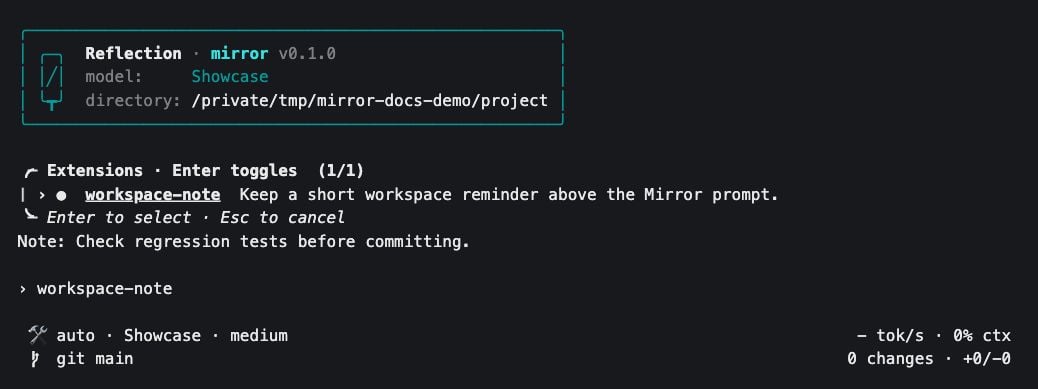
1. Run `/extensions` to open the picker.
2. Type to filter the list, then use the arrow keys to select an entry.
3. Press `Enter` to toggle it. The picker stays open so you can change several entries.
4. Press `Escape` when finished.
| Indicator | State |
| - | - |
| Filled circle | Enabled |
| Empty circle | Disabled |
Disabling an extension removes its commands, tools, and UI from the running workspace agents.
 Choices persist in `~/.mirror/config.json`:
* Bundled entries use keys such as `builtin/editor`.
* External entries use the resolved absolute path to their `extension.py` file.
* Moving an external extension can trigger a new trust decision.
## Bundled extensions
These names appear in the picker:
| Extension | What it adds |
| - | - |
| `inference_controls` | `/model`, `/reasoning`, `/login`, and `/logout`. |
| `context_usage` | `/context`, with system-prompt and tool-token estimates. |
| `editor` | `/editor` and `Ctrl+P` to open the file picker. |
| `connections` | Service and MCP server connections, with `/connect`, `/connections`, and `/disconnect`. |
| `memory` | `/memory`, to turn memory on or off and import memories. |
| `repository_status` | Branch or revision and file-change totals in the footer. |
| `tokens_per_second` | Generation-speed information in the footer. |
| `todo` | A task list that the agent can update. Disabled by default. |
| `beta` | The beta notice and `/feedback`. |
| `user_extensions` | A tool for asking the agent to create and manage custom extensions. Disabled by default. |
* For command arguments, see the [CLI reference](/mirror-cli-reference#slash-commands).
* For server configuration, see [MCP servers](/mirror-cli-reference#mcp-servers).
## Install an external extension
An external extension is a directory with an `extension.py` file. Choose a location:
| Location | Discovery |
| - | - |
| `~/.mirror/extensions//extension.py` | Available when you launch Mirror in any project. |
| `.mirror/extensions//extension.py` | Discovered along the path from the repository root to the directory where you launch Mirror. |
* Outside a repository, Mirror checks the launch directory for project extensions.
* Discovery uses the launch directory. Switching workspaces does not scan a new directory for additional extensions.
1. Add the `extension.py` file in one of these locations.
2. Start Mirror.
3. Review the code and select **Enable** if you trust it.
For newly discovered external code, the consent prompt offers these choices:
| Choice | Result |
| - | - |
| **Disable** | Leave the extension disabled and save the decision. This is the default choice. |
| **Enable** | Load the extension and save the decision. |
| `Escape` | Leave the decision pending for a later launch. |
Extensions run Python code inside Mirror with your account's permissions.
* Enabling an extension allows its imports and callbacks to execute.
* Tool-approval mode does not sandbox that code.
* Use `/extensions` to change the decision later.
* After editing Python source, toggle the extension off and on, or restart Mirror.
* Saving the file alone does not reload its code.
With `mirror --trust-extensions`:
* Newly discovered external extensions are enabled without the consent prompt.
* Existing disabled choices are preserved.
To suppress external discovery for a launch while keeping bundled features available:
```bash theme={null}
MIRROR_EXTENSIONS_ENABLED=false mirror
```
## Example: a workspace reminder
This extension adds `/note` and shows its text above the prompt. It performs no file, network, or model operations.
Create the directory in your project:
```bash theme={null}
mkdir -p .mirror/extensions/workspace-note
```
Save this as `.mirror/extensions/workspace-note/extension.py`:
```python theme={null}
"""Keep a short workspace reminder above the Mirror prompt."""
from __future__ import annotations
import dataclasses
from collections.abc import Sequence
from typing import override
from prompt_toolkit.layout import containers, controls
from mirror.cli import actions, commands, extension, state
@dataclasses.dataclass(frozen=True)
class _SetNote(actions.ExtensionAction):
text: str
class WorkspaceNote(extension.Extension[str, None, None]):
supports_local = True
@classmethod
@override
def id(cls) -> str:
return 'user/workspace-note'
@staticmethod
@override
def initial_state() -> str:
return ''
@override
def render_region(self) -> extension.RenderRegion:
return extension.RenderRegion.WIDGET_ABOVE_PROMPT
@override
def slash_commands(self) -> Sequence[commands.CommandDef]:
return (
commands.CommandDef(
'note',
'Set a workspace reminder; omit text to clear it',
lambda _context, text: actions.RoutedExtensionAction(
self.id(), _SetNote(text.strip())
),
arguments=commands.OptionalArguments('[text]'),
available_when_busy=True,
),
)
@override
def reduce(
self, global_state: state.State, action: actions.Action
) -> tuple[str, tuple[extension.PrivateEffect[None], ...]]:
current = self.require_state(global_state)
if (
isinstance(action, actions.RoutedExtensionAction)
and action.extension_id == self.id()
and isinstance(action.action, _SetNote)
):
return action.action.text, ()
return current, ()
@override
def render(
self, global_state: state.State, extension_state: str
) -> containers.AnyContainer | None:
if not extension_state:
return None
return containers.Window(
controls.FormattedTextControl([('class:footer', f'Note: {extension_state}')]),
height=1,
)
```
1. Start Mirror.
2. Enable `workspace-note` when prompted.
3. Set a reminder with `/note`:
```text theme={null}
/note Check regression tests before committing.
```
Choices persist in `~/.mirror/config.json`:
* Bundled entries use keys such as `builtin/editor`.
* External entries use the resolved absolute path to their `extension.py` file.
* Moving an external extension can trigger a new trust decision.
## Bundled extensions
These names appear in the picker:
| Extension | What it adds |
| - | - |
| `inference_controls` | `/model`, `/reasoning`, `/login`, and `/logout`. |
| `context_usage` | `/context`, with system-prompt and tool-token estimates. |
| `editor` | `/editor` and `Ctrl+P` to open the file picker. |
| `connections` | Service and MCP server connections, with `/connect`, `/connections`, and `/disconnect`. |
| `memory` | `/memory`, to turn memory on or off and import memories. |
| `repository_status` | Branch or revision and file-change totals in the footer. |
| `tokens_per_second` | Generation-speed information in the footer. |
| `todo` | A task list that the agent can update. Disabled by default. |
| `beta` | The beta notice and `/feedback`. |
| `user_extensions` | A tool for asking the agent to create and manage custom extensions. Disabled by default. |
* For command arguments, see the [CLI reference](/mirror-cli-reference#slash-commands).
* For server configuration, see [MCP servers](/mirror-cli-reference#mcp-servers).
## Install an external extension
An external extension is a directory with an `extension.py` file. Choose a location:
| Location | Discovery |
| - | - |
| `~/.mirror/extensions//extension.py` | Available when you launch Mirror in any project. |
| `.mirror/extensions//extension.py` | Discovered along the path from the repository root to the directory where you launch Mirror. |
* Outside a repository, Mirror checks the launch directory for project extensions.
* Discovery uses the launch directory. Switching workspaces does not scan a new directory for additional extensions.
1. Add the `extension.py` file in one of these locations.
2. Start Mirror.
3. Review the code and select **Enable** if you trust it.
For newly discovered external code, the consent prompt offers these choices:
| Choice | Result |
| - | - |
| **Disable** | Leave the extension disabled and save the decision. This is the default choice. |
| **Enable** | Load the extension and save the decision. |
| `Escape` | Leave the decision pending for a later launch. |
Extensions run Python code inside Mirror with your account's permissions.
* Enabling an extension allows its imports and callbacks to execute.
* Tool-approval mode does not sandbox that code.
* Use `/extensions` to change the decision later.
* After editing Python source, toggle the extension off and on, or restart Mirror.
* Saving the file alone does not reload its code.
With `mirror --trust-extensions`:
* Newly discovered external extensions are enabled without the consent prompt.
* Existing disabled choices are preserved.
To suppress external discovery for a launch while keeping bundled features available:
```bash theme={null}
MIRROR_EXTENSIONS_ENABLED=false mirror
```
## Example: a workspace reminder
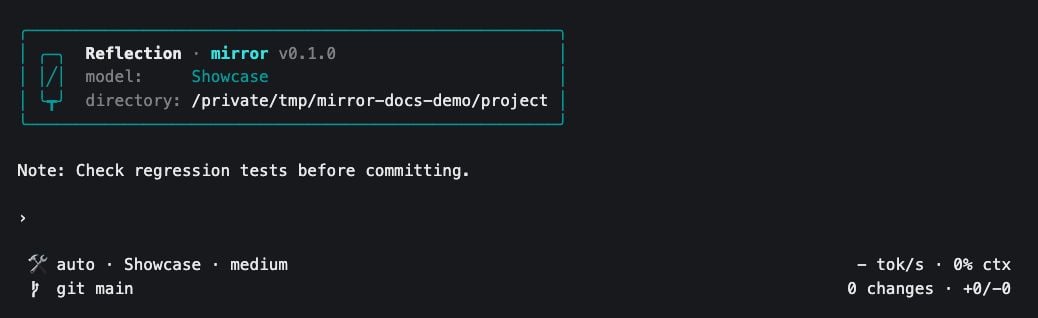
This extension adds `/note` and shows its text above the prompt. It performs no file, network, or model operations.
Create the directory in your project:
```bash theme={null}
mkdir -p .mirror/extensions/workspace-note
```
Save this as `.mirror/extensions/workspace-note/extension.py`:
```python theme={null}
"""Keep a short workspace reminder above the Mirror prompt."""
from __future__ import annotations
import dataclasses
from collections.abc import Sequence
from typing import override
from prompt_toolkit.layout import containers, controls
from mirror.cli import actions, commands, extension, state
@dataclasses.dataclass(frozen=True)
class _SetNote(actions.ExtensionAction):
text: str
class WorkspaceNote(extension.Extension[str, None, None]):
supports_local = True
@classmethod
@override
def id(cls) -> str:
return 'user/workspace-note'
@staticmethod
@override
def initial_state() -> str:
return ''
@override
def render_region(self) -> extension.RenderRegion:
return extension.RenderRegion.WIDGET_ABOVE_PROMPT
@override
def slash_commands(self) -> Sequence[commands.CommandDef]:
return (
commands.CommandDef(
'note',
'Set a workspace reminder; omit text to clear it',
lambda _context, text: actions.RoutedExtensionAction(
self.id(), _SetNote(text.strip())
),
arguments=commands.OptionalArguments('[text]'),
available_when_busy=True,
),
)
@override
def reduce(
self, global_state: state.State, action: actions.Action
) -> tuple[str, tuple[extension.PrivateEffect[None], ...]]:
current = self.require_state(global_state)
if (
isinstance(action, actions.RoutedExtensionAction)
and action.extension_id == self.id()
and isinstance(action.action, _SetNote)
):
return action.action.text, ()
return current, ()
@override
def render(
self, global_state: state.State, extension_state: str
) -> containers.AnyContainer | None:
if not extension_state:
return None
return containers.Window(
controls.FormattedTextControl([('class:footer', f'Note: {extension_state}')]),
height=1,
)
```
1. Start Mirror.
2. Enable `workspace-note` when prompted.
3. Set a reminder with `/note`:
```text theme={null}
/note Check regression tests before committing.
```
 | Action | Result |
| - | - |
| Run `/note` without text | Clear the reminder. |
| Switch workspaces and run `/note ` | Set a separate reminder in the other workspace. |
| Open a new session | Reset the reminder. |
The text belongs to the workspace's current session. This example does not save reminders to disk.
### How the example works
1. `slash_commands()` registers the command. Its handler returns a `RoutedExtensionAction` containing the text.
2. `reduce()` applies that action to this workspace's extension state.
3. `render()` draws the resulting reminder above the prompt.
When writing an extension:
* Keep `id()` stable and unique.
* Define one concrete `Extension` subclass in the module, with a no-argument constructor.
* Set `supports_local = True` for local workspaces.
## Extension API
Start with the reminder example, then add the hooks your extension needs:
| Hook | Purpose |
| - | - |
| `initial_state()` | Return fresh state for a workspace session. |
| `slash_commands()` | Return `commands.CommandDef` entries. Command names omit `/`; handlers synchronously return an action or `None`. |
| `keybindings()` | Return `keymap.Binding` entries for shortcuts. Standalone `Escape` is reserved. |
| `reduce(global_state, action)` | Return updated extension state and a tuple of effects. |
| `handle_effect(context, payload)` | Perform asynchronous work emitted with `self.effect(payload)`. |
| `render_region()` | Choose `STATUS_LEFT`, `STATUS_RIGHT`, `WIDGET_ABOVE_PROMPT`, or `WIDGET_BELOW_PROMPT`. |
| `render(global_state, extension_state)` | Return a prompt-toolkit container, or `None` when there is nothing to show. |
| `tools(context)` | Return model-facing `HostTool` implementations. |
* Keep file and network operations out of `reduce()` and `render()`.
* Emit an effect and do the work in `handle_effect()` so rendering remains responsive.
A model-facing tool must:
* Expose a `ToolDefinition`.
* Implement `async execute(arguments: str) -> ToolResult`. The argument string contains JSON.
Tools require model-call approval by default, subject to the workspace's approval mode.
## Extensions across workspaces
| Behavior | Scope |
| - | - |
| Participation | Extensions with `supports_local = True` participate in all local workspaces by default. |
| Python object and lifecycle | Shared across workspaces. |
| Extension state | Separate for each workspace. |
| Background effects | Keep running when you switch workspaces. |
| Opening a conversation | Resets extension state by default. An extension can change this with `reset_on_session_open`. |
| Enable and disable choices | Shared user settings. Disabling a project-discovered extension unloads it from every workspace where it is active. |
Store workspace-specific values in extension state, as the reminder example does, rather than on the shared Python object.
## Ask Mirror to create an extension
Enable the bundled `user_extensions` entry in `/extensions` to let the agent author and manage global user extensions. It exposes the `user-extensions__extensions` tool with these actions:
| Action | What it does |
| - | - |
| `list` | Show loaded user extensions and their workspace status. |
| `create` | Write a widget scaffold under `~/.mirror/extensions//extension.py` without loading it. |
| `load` | Enable the extension by directory name. |
| `reload` | Reload an edited extension by its extension ID. |
| `unload` | Disable an extension by ID while keeping its files. |
For example:
```text theme={null}
Create a user extension named session-clock that shows elapsed time
below the prompt. Keep its ID stable. Show me the source before loading it.
```
* Review the generated code before asking Mirror to load it.
* `create` only writes the scaffold. Loading is a separate step.
* If you want tool-call review while the agent works, choose manual approval with `/permissions`.
## Troubleshoot an extension
| Problem | What to check |
| - | - |
| Missing from the picker | Check the directory name, `extension.py` filename, and the directory where you launched Mirror. |
| Appears but will not load | Check its Python syntax, imports, concrete `Extension` subclass, and stable ID. Inspect the session's `cli-stderr` log under `~/.mirror/logs/`. |
| An edit has no effect | Toggle it off and on to load the updated source. |
| A command disappears | Check whether its owning extension is enabled, then run `/help` again. |
Remove API keys and private code before sharing logs. See [reporting a bug](/mirror-cli-reference#report-a-bug).
| Action | Result |
| - | - |
| Run `/note` without text | Clear the reminder. |
| Switch workspaces and run `/note ` | Set a separate reminder in the other workspace. |
| Open a new session | Reset the reminder. |
The text belongs to the workspace's current session. This example does not save reminders to disk.
### How the example works
1. `slash_commands()` registers the command. Its handler returns a `RoutedExtensionAction` containing the text.
2. `reduce()` applies that action to this workspace's extension state.
3. `render()` draws the resulting reminder above the prompt.
When writing an extension:
* Keep `id()` stable and unique.
* Define one concrete `Extension` subclass in the module, with a no-argument constructor.
* Set `supports_local = True` for local workspaces.
## Extension API
Start with the reminder example, then add the hooks your extension needs:
| Hook | Purpose |
| - | - |
| `initial_state()` | Return fresh state for a workspace session. |
| `slash_commands()` | Return `commands.CommandDef` entries. Command names omit `/`; handlers synchronously return an action or `None`. |
| `keybindings()` | Return `keymap.Binding` entries for shortcuts. Standalone `Escape` is reserved. |
| `reduce(global_state, action)` | Return updated extension state and a tuple of effects. |
| `handle_effect(context, payload)` | Perform asynchronous work emitted with `self.effect(payload)`. |
| `render_region()` | Choose `STATUS_LEFT`, `STATUS_RIGHT`, `WIDGET_ABOVE_PROMPT`, or `WIDGET_BELOW_PROMPT`. |
| `render(global_state, extension_state)` | Return a prompt-toolkit container, or `None` when there is nothing to show. |
| `tools(context)` | Return model-facing `HostTool` implementations. |
* Keep file and network operations out of `reduce()` and `render()`.
* Emit an effect and do the work in `handle_effect()` so rendering remains responsive.
A model-facing tool must:
* Expose a `ToolDefinition`.
* Implement `async execute(arguments: str) -> ToolResult`. The argument string contains JSON.
Tools require model-call approval by default, subject to the workspace's approval mode.
## Extensions across workspaces
| Behavior | Scope |
| - | - |
| Participation | Extensions with `supports_local = True` participate in all local workspaces by default. |
| Python object and lifecycle | Shared across workspaces. |
| Extension state | Separate for each workspace. |
| Background effects | Keep running when you switch workspaces. |
| Opening a conversation | Resets extension state by default. An extension can change this with `reset_on_session_open`. |
| Enable and disable choices | Shared user settings. Disabling a project-discovered extension unloads it from every workspace where it is active. |
Store workspace-specific values in extension state, as the reminder example does, rather than on the shared Python object.
## Ask Mirror to create an extension
Enable the bundled `user_extensions` entry in `/extensions` to let the agent author and manage global user extensions. It exposes the `user-extensions__extensions` tool with these actions:
| Action | What it does |
| - | - |
| `list` | Show loaded user extensions and their workspace status. |
| `create` | Write a widget scaffold under `~/.mirror/extensions//extension.py` without loading it. |
| `load` | Enable the extension by directory name. |
| `reload` | Reload an edited extension by its extension ID. |
| `unload` | Disable an extension by ID while keeping its files. |
For example:
```text theme={null}
Create a user extension named session-clock that shows elapsed time
below the prompt. Keep its ID stable. Show me the source before loading it.
```
* Review the generated code before asking Mirror to load it.
* `create` only writes the scaffold. Loading is a separate step.
* If you want tool-call review while the agent works, choose manual approval with `/permissions`.
## Troubleshoot an extension
| Problem | What to check |
| - | - |
| Missing from the picker | Check the directory name, `extension.py` filename, and the directory where you launched Mirror. |
| Appears but will not load | Check its Python syntax, imports, concrete `Extension` subclass, and stable ID. Inspect the session's `cli-stderr` log under `~/.mirror/logs/`. |
| An edit has no effect | Toggle it off and on to load the updated source. |
| A command disappears | Check whether its owning extension is enabled, then run `/help` again. |
Remove API keys and private code before sharing logs. See [reporting a bug](/mirror-cli-reference#report-a-bug).