> ## Documentation Index
> Fetch the complete documentation index at: https://developers.reflection.ai/llms.txt
> Use this file to discover all available pages before exploring further.
# Mirror CLI overview
> How Mirror CLI is organized, what's on screen, and how to steer and review the agent's work
Mirror CLI is Reflection's coding agent for the terminal. You describe a task, and the agent reads your code, edits files, and runs commands in your project until the task is done, showing each step as it goes. It uses Reflection and `Beam-501B-A23B` by default.
To install Mirror and connect it to Reflection, follow the [coding agent quickstart](/coding-agents-quickstart#mirror). This page explains how Mirror works once it's running.
Mirror CLI is in early beta, and commands and behavior may change between releases. Run `/help` to see the commands in your installation.
## How Mirror is organized
Run `mirror` in a project directory to start a Mirror session. The first time you start Mirror in a directory, it asks you to confirm that you trust that directory's files. That one process holds everything else:
* **Workspace.** A directory with its own agent and its own conversation. Mirror starts with one workspace for the directory you launched from. You can add more with `/worktree`, which creates a separate checkout so that two agents can edit files without getting in each other's way. See [workspaces](/mirror-workspaces).
* **Conversation.** The history of prompts, agent replies, and tool calls in a workspace. Mirror saves every conversation in `~/.mirror`, so you can resume one later or branch from an earlier turn.
* **Tools.** How the agent acts on your project: reading and searching files, editing them, and running shell commands. Tools run on your machine with your account's permissions. [Connections](/mirror-mcp) to services such as Linear or Notion, and [extensions](/mirror-extensions), can add more.
* **Instructions and skills.** Guidance the agent reads before it starts, from `AGENTS.md` files and reusable skill directories. See [instructions and skills](/mirror-instructions-and-skills).
Workspaces are independent: switching to another one doesn't pause the agent you left, and each keeps its own model, reasoning effort, and approval mode.
## The Mirror screen
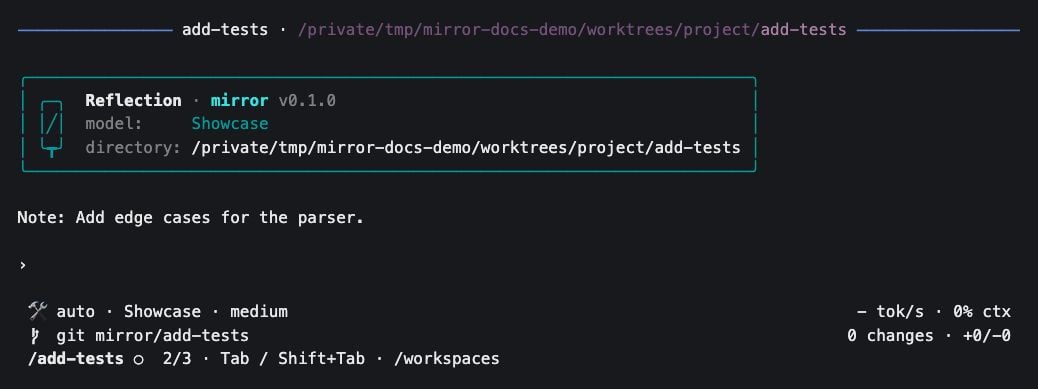 From top to bottom:
1. **Transcript.** The conversation so far. Before the first prompt it shows a card with the model and working directory. Use `Ctrl+T` or `/view` to switch between full, `compact`, and `extra-compact` detail.
2. **Prompt.** Where you type. Extensions can show widgets above or below it.
3. **Settings line.** The approval mode (`manual` or `auto`), the model, and the reasoning effort on the left, and generation speed and context use on the right.
4. **Repository line.** The current branch and a count of uncommitted changes.
5. **Workspace tabs.** Shown once you have more than one workspace, with a [status indicator](/mirror-workspaces#agent-status) for each agent.
## Work with the agent
| To | Do this |
| - | - |
| Send a task | Type it and press `Enter`. Press `Ctrl+J` to start a new line instead. |
| Add to a task while the agent works | Type and press `Enter`. Mirror queues the message for the agent, without stopping it, and shows it above the prompt until the agent picks it up. |
| Stop the agent | Press `Escape`, even at an approval prompt. The turn ends, and queued messages and anything you were typing return to the prompt for you to edit and resend. |
| Let a slow command run in the background | Press `Ctrl+B`. The agent carries on without waiting, and the command moves to a task list below the prompt. Press `Down` to select a task and `x` to cancel it. |
| Find an earlier prompt | Press `Ctrl+R` to search prompt history. |
| Exit | Press `Ctrl+D`, or `Ctrl+C` with an empty prompt. With text in the prompt, `Ctrl+C` clears it and saves it to history. |
## Choose what to approve
By default Mirror runs in **manual** mode: it pauses before shell commands (including ones that only read, such as `ls`), file writes and edits, connected-service tools, and most tools that extensions add. It shows the call, and you press `1` or `Enter` to approve, or `2` to reject. Reading and searching files with the agent's built-in tools never needs approval. Pressing `Escape` at an approval prompt stops the whole turn, not just that call.
Switch to **auto** mode to let the agent use every tool without asking. That's faster, and it suits a project under version control where you'll review the result. To switch, do any one of these:
1. Press `F2` to toggle between manual and auto.
2. Run `/permissions` and choose a mode.
3. Start Mirror with `mirror --approval-mode auto`.
Mirror remembers your choice and uses it the next time you start Mirror, in any directory.
Approval mode decides what you review. It isn't a sandbox. Approved commands, extensions, and local MCP servers run with your account's full permissions.
Mirror does keep its own provider API keys, such as `REFLECTION_API_KEY`, out of the environment of commands the agent runs.
## Conversations
Each workspace has one active conversation. Mirror saves it as you go, so nothing is lost when you exit.
| To | Do this |
| - | - |
| Start over | Run `/new` to start a fresh conversation in the current workspace. |
| Pick up earlier work | Run `/resume` to open a searchable list of saved conversations. Press `Tab` in the list to widen it from the current directory to the whole repository, then to every directory. |
| Resume when you start Mirror | Run `mirror --continue` to reopen each workspace's most recent conversation. |
| Try a different approach | Run `/rewind`, choose an earlier prompt, and edit it. Mirror continues from there as a new branch of the conversation, and the original keeps its later turns. |
Rewinding changes only the conversation. Files the agent edited after that point stay as they are. Use version control to undo file changes.
## Next steps
Run several tasks in parallel, each in its own checkout.
Change the model, reasoning effort, or provider.
Give the agent project guidance and reusable procedures.
Look up commands, shortcuts, launch options, and files.
From top to bottom:
1. **Transcript.** The conversation so far. Before the first prompt it shows a card with the model and working directory. Use `Ctrl+T` or `/view` to switch between full, `compact`, and `extra-compact` detail.
2. **Prompt.** Where you type. Extensions can show widgets above or below it.
3. **Settings line.** The approval mode (`manual` or `auto`), the model, and the reasoning effort on the left, and generation speed and context use on the right.
4. **Repository line.** The current branch and a count of uncommitted changes.
5. **Workspace tabs.** Shown once you have more than one workspace, with a [status indicator](/mirror-workspaces#agent-status) for each agent.
## Work with the agent
| To | Do this |
| - | - |
| Send a task | Type it and press `Enter`. Press `Ctrl+J` to start a new line instead. |
| Add to a task while the agent works | Type and press `Enter`. Mirror queues the message for the agent, without stopping it, and shows it above the prompt until the agent picks it up. |
| Stop the agent | Press `Escape`, even at an approval prompt. The turn ends, and queued messages and anything you were typing return to the prompt for you to edit and resend. |
| Let a slow command run in the background | Press `Ctrl+B`. The agent carries on without waiting, and the command moves to a task list below the prompt. Press `Down` to select a task and `x` to cancel it. |
| Find an earlier prompt | Press `Ctrl+R` to search prompt history. |
| Exit | Press `Ctrl+D`, or `Ctrl+C` with an empty prompt. With text in the prompt, `Ctrl+C` clears it and saves it to history. |
## Choose what to approve
By default Mirror runs in **manual** mode: it pauses before shell commands (including ones that only read, such as `ls`), file writes and edits, connected-service tools, and most tools that extensions add. It shows the call, and you press `1` or `Enter` to approve, or `2` to reject. Reading and searching files with the agent's built-in tools never needs approval. Pressing `Escape` at an approval prompt stops the whole turn, not just that call.
Switch to **auto** mode to let the agent use every tool without asking. That's faster, and it suits a project under version control where you'll review the result. To switch, do any one of these:
1. Press `F2` to toggle between manual and auto.
2. Run `/permissions` and choose a mode.
3. Start Mirror with `mirror --approval-mode auto`.
Mirror remembers your choice and uses it the next time you start Mirror, in any directory.
Approval mode decides what you review. It isn't a sandbox. Approved commands, extensions, and local MCP servers run with your account's full permissions.
Mirror does keep its own provider API keys, such as `REFLECTION_API_KEY`, out of the environment of commands the agent runs.
## Conversations
Each workspace has one active conversation. Mirror saves it as you go, so nothing is lost when you exit.
| To | Do this |
| - | - |
| Start over | Run `/new` to start a fresh conversation in the current workspace. |
| Pick up earlier work | Run `/resume` to open a searchable list of saved conversations. Press `Tab` in the list to widen it from the current directory to the whole repository, then to every directory. |
| Resume when you start Mirror | Run `mirror --continue` to reopen each workspace's most recent conversation. |
| Try a different approach | Run `/rewind`, choose an earlier prompt, and edit it. Mirror continues from there as a new branch of the conversation, and the original keeps its later turns. |
Rewinding changes only the conversation. Files the agent edited after that point stay as they are. Use version control to undo file changes.
## Next steps
Run several tasks in parallel, each in its own checkout.
Change the model, reasoning effort, or provider.
Give the agent project guidance and reusable procedures.
Look up commands, shortcuts, launch options, and files.