

The Reflection platform is in beta, and access is opening gradually. New sign-ups join a waitlist and can create API keys once their access is enabled.
Mirror’s built-in Reflection provider selects its endpoint automatically. Use the Mirror setup steps to select Reflection and provide your API key.
Before you start
1
Create an API key
Sign in to the Reflection platform, open API Keys, and create a key. Export it in the shell you start your agent from, or add the line to your shell profile:
2
Check the key
List the models your key can use:The response lists
Beam-501B-A23B. If you get a 401 instead, see Troubleshooting.3
Create a sample project
Each guide uses the same first task: fixing a failing test in a small Python project. Create the project now; you need Python 3 and Git.
python3 -m unittest fails with AssertionError: 3.0 != 4.Set up your agent
- Mirror CLI
- Pi
- OpenCode
- Hermes Agent
Mirror CLI is Reflection’s coding agent for the terminal. It uses Reflection and The installer selects the wheel for your platform, verifies its checksum, installs uv and Python 3.12 if needed, and updates your shell configuration. To update Mirror, run the installer again.Open a new terminal after installation, then run
Mirror CLI asks before it runs each tool, including commands that only read files. Press The expected result is passing tests and this one-line change to The model can take a different path to the same fix, for example by editing the file with a shell command instead of an edit tool.
Beam-501B-A23B by default, so connecting it takes only an API key.Install Mirror CLI
Mirror CLI runs on macOS 15 or later on Apple Silicon, and on Linux with glibc 2.28 or later on x86-64 or ARM64. Git or Jujutsu is needed for worktree management; you can start a session in a plain directory without either. Native Windows isn’t supported.Install Mirror CLI:mirror in your project.Install a wheel manually
Install a wheel manually
If you already have a Mirror CLI release wheel, install it with uv:Don’t run
uv tool install mirror: the mirror package on PyPI is unrelated. If your shell can’t find mirror after installing, run uv tool update-shell and open a new terminal.Connect Mirror CLI to Reflection
1
Start Mirror CLI
Run
mirror in your project. The first time, Mirror CLI shows a Using Mirror notice. In each new directory, it then asks Continue and trust this folder? [y/N]; type y and press Enter to continue.If you’ve used Mirror CLI with another provider, run /model reflection once it starts. Mirror CLI remembers that choice. mirror --api reflection --model Beam-501B-A23B selects Reflection for that launch only.If REFLECTION_API_KEY is set or a saved Reflection key is available, Mirror CLI opens the prompt and you can skip the next step. An environment key takes precedence over the saved key.2
Paste your API key
Without an environment key or a saved key, Mirror CLI opens a Connect to Reflection screen with a link to create one: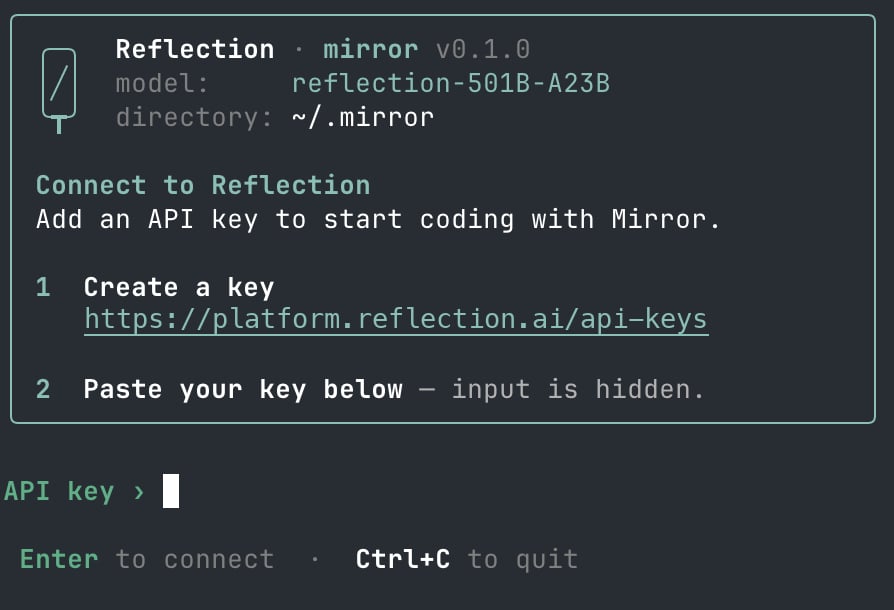
API key › prompt and press Enter. The input is masked, with one * for each character. Mirror CLI saves the key to ~/.mirror/reflection_api_key, readable only by your user, and uses it in later sessions. It doesn’t check the key when it saves it; if the key is wrong, requests fail with 401, and /logout removes the saved key so you can paste another. Press Ctrl+C to cancel without saving.REFLECTION_API_KEY takes precedence over the saved key. Like other local credentials, the saved key can be read by any command that runs as your user.3
Check the model
The card at the top of the session shows
model: Beam-501B-A23B.Run a first task in Mirror CLI
From the sample project, runmirror and enter:1 or Enter to approve each one. It shows each tool call as it works. Press Ctrl+C to exit when it’s done.Review what Mirror CLI reports. The intended fix replaces len(nums) + 1 with len(nums) in stats.py. Confirm the result yourself:stats.py:Sessions and permissions in Mirror CLI
- Start a session. Run
mirrorin your project. Type/to browse commands, or runmirror --helpfor launch options. - Resume.
/resumepicks an earlier conversation, and/newstarts a fresh one.mirror --continuecontinues recent conversations at startup. - Choose the model and reasoning effort.
/modelswitches models, and Mirror CLI remembers the choice./reasoningsets the reasoning effort; the default isxhigh. - Work in parallel.
/worktree [name]starts an independent task in a checkout of the latestorigin/main, so the repository needs anoriginremote. It does not copy your current edits. Switch between worktree tabs withTabandShift+Tab. - Permissions. By default, Mirror CLI asks before it runs each tool, including shell commands that only read files, such as
ls. Press1orEnterto approve, or2to reject. To approve tool calls automatically, pressF2, use/permissions, or start Mirror CLI with--approval-mode auto. Mirror CLI remembers the choice for every directory, in~/.mirror/config.json. Tools run locally with your account’s permissions; Mirror CLI isn’t a sandbox.
Limits
- For Pi, OpenCode, and Hermes, configure an OpenAI-compatible Chat Completions provider. The public API supports Chat Completions and Models, not the OpenAI Responses API. Mirror uses its built-in Reflection provider. See OpenAI compatibility.
- Coding agents can send many model requests while completing a task. These count toward your organization’s rate limits like any other request.
Troubleshooting
401 Unauthorized
401 Unauthorized
The API key is missing, malformed, or not valid. Check that
REFLECTION_API_KEY is exported in the shell you started the agent from: run the key check in that shell. If you added the export to your shell profile, open a new terminal or source the profile. See Authentication.If Mirror uses a saved key that’s wrong, run /logout and paste a new key. If Pi prints No models available or No API key found, or OpenCode prints Provide an API key or Playground credential in the Authorization header, REFLECTION_API_KEY isn’t set in that shell. OpenCode reports a wrong key as Incorrect API key provided, without the status code. Hermes shows the same message when the key is unset, and suggests hermes setup; ignore that, because the Hermes guide reads the key through key_env instead. ~/.hermes/logs/errors.log says when REFLECTION_API_KEY is empty or unset.404 or model not found
404 or model not found
- Check that the model ID is exactly
Beam-501B-A23B, including capitalization. OpenCode reports a wrong ID asThe model [<ID>] you requested is unavailable. - In Pi, OpenCode, or Hermes, check that the base URL is
https://api.reflection.ai/openai/v1, ending in/openai/v1with no trailing path such as/chat/completions. The agent adds that path itself. With a trailing path, OpenCode printsNot Found: 404 page not found. - In Mirror, run
/modeland select Reflection API, its built-in Reflection provider, or run/model reflection. You do not set a base URL for that provider.
429 Too Many Requests
429 Too Many Requests
A rate limit was exceeded. Wait and retry the task, or run fewer agent sessions at once. See Rate limits.
Timeouts or 502 and 503 errors
Timeouts or 502 and 503 errors
Reasoning on a large task can take a while before the first output appears. If requests fail with
502 or 503, or time out repeatedly, retry the task. See Errors.400: Missing required parameter reasoning_content
400: Missing required parameter reasoning_content
Every request in a session fails with The model sometimes returns a tool-call step without reasoning. An agent that sends that step back without
400 missing_required_parameter:reasoning_content gets this error on every later request in the session. Start a new session: /new in Mirror or Pi, or opencode run without -c in OpenCode. In Hermes, check that hermes config get model.reasoning_echo prints true.The agent uses a different model
The agent uses a different model
- Check the model name the agent prints when it starts.
- In Mirror, use
/model reflectionto change the saved model selection. Launching withmirror --api reflection --model Beam-501B-A23Buses it for that launch only. - In Pi, OpenCode, or Hermes, check the default provider and model in the configuration shown in its guide.
Share feedback
For Mirror CLI, run/feedback to open the GitHub feedback form. Review your report before submitting; no session data or diagnostics are attached automatically. See reporting a bug.
If a guide on this page doesn’t work for you, keep a note of the agent and its version, your operating system, the command you ran, and the error message. Leave out your API key.