

- The first workspace uses the directory and branch you started from.
- You can also start in a plain directory.
- Creating additional workspaces requires Git or Jujutsu.
Create a workspace
In a Git repository whoseorigin remote has a main branch, run:
- Fetches
origin/main. - Creates the branch
mirror/parser-tests. - Checks it out under
~/.mirror/worktrees/<repository-and-hash>/parser-tests.
- The new workspace starts a fresh conversation.
- It inherits the source workspace’s model, reasoning effort, and approval mode.
- If you launched Mirror in a subdirectory, it uses the corresponding subdirectory in the new checkout. Start from the repository root if that subdirectory does not exist on
origin/main.
The new checkout starts at the fetched main branch. Your current branch, uncommitted edits, and untracked files are not copied into it.
parser-tests or review-api.
- Use 1 to 64 ASCII letters, numbers, dots, dashes, or underscores.
- Start with a letter or number.
- Do not include
..or end with.or.lock.
main from origin and creates a workspace at main@origin.
Find and switch workspaces
Run/workspaces to open the picker. Each entry shows its name, agent status, and directory. The active entry is marked (current).
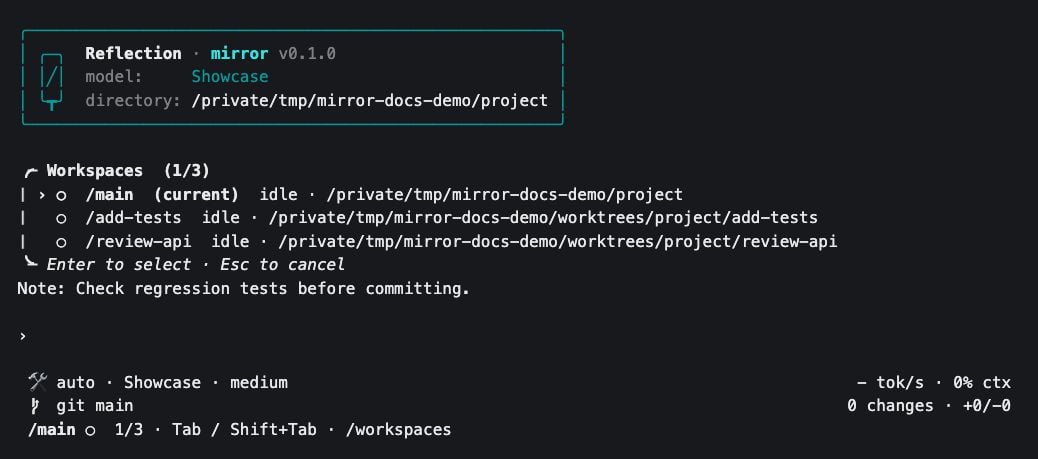
The workspace picker in a demonstration project with temporary checkout paths.
- Type to search by workspace name or directory.
- Use the arrow keys or
TabandShift+Tabto move the highlight. - Press
Enterto switch, orEscapeto close the picker.
- With at least two workspaces, the footer shows the selected workspace and its position, such as
2/3. - Run
/statusto check the active working directory, conversation ID, model, and reasoning effort before sending a task.
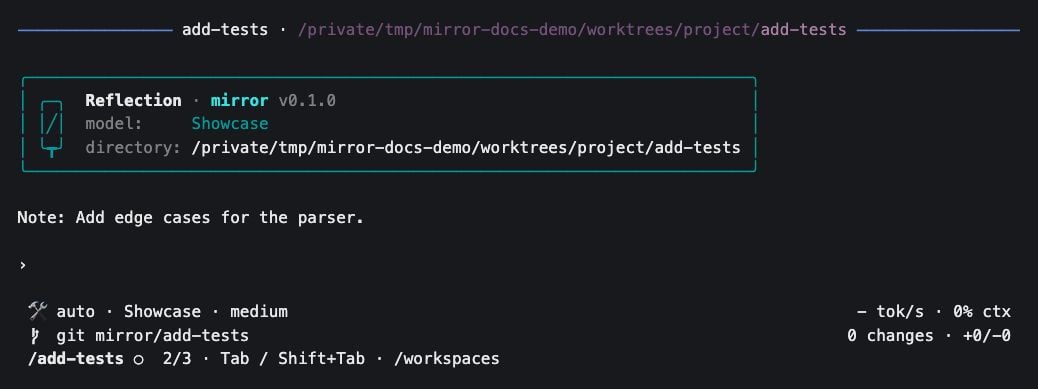
The selected task workspace has its own agent and reminder text. This is an isolated example session.
Agent status
The picker and workspace footer show what each agent is doing:- Switching preserves each conversation and any running turn.
- An agent can continue working while you use another workspace in the same Mirror process.
- Selecting a workspace clears its unread indicator.
Run two tasks in parallel
For example, let one agent add tests while another investigates the current implementation:-
Run
/worktree parser-testsfrom the original checkout. -
Open
/workspaces, selectparser-tests, and pressEnter. -
Give it a task:
-
Switch back to the original checkout and send a separate task:
-
Return to
parser-teststo review its diff and test results. If its status is!, approve or reject the waiting tool call there.
Names and settings
To give the selected workspace a clearer display name:- The alias changes the picker and footer labels.
- The Git branch, Jujutsu workspace name, directory, and conversation keep their existing names.
~/.mirror/cli.db. When Mirror starts, the first workspace uses the approval mode saved in ~/.mirror/config.json. Select a workspace to change its settings independently:
- Extension enablement comes from the shared user configuration.
- A loaded extension can participate in multiple workspaces while keeping separate state in each one. See extensions.
Return to existing work
When you start Mirror again:- Mirror rediscovers managed checkouts belonging to the repository.
- The workspace list includes the launch checkout and those managed checkouts by default.
- Mirror selects the most recent saved conversation for each workspace’s working directory.
- A discovered workspace’s saved agent starts when you select it.
- Use
/resumewithin a workspace to choose a different conversation.
Show other existing checkouts
To include Git worktrees or Jujutsu workspaces created outside Mirror, add this setting to~/.mirror/config.json. Preserve any existing extension settings in the file.
Review and integrate changes
The repository footer shows the branch or revision, changed-file count, and added/deleted lines. In Git:- The summary counts tracked staged and unstaged changes against
HEAD. - It excludes untracked files and committed differences from
main.
parser-tests example:
-
Review changes from that checkout in another terminal, or ask its agent to run these commands:
- Run the relevant tests, then commit the files you reviewed.
-
When your target checkout is ready, integrate the completed branch there:
Remove a workspace
- Select the completed workspace.
- Preserve its work.
-
Run:
- Mirror refuses to remove the primary checkout or the only available workspace.
- Removing an unmanaged checkout asks for confirmation and names its directory.
- Leaves its branch and saved conversations in place.
- Removes the workspace’s alias and preferences.
- Reusing the workspace name can fail while its Git branch still exists.