

Mirror and its extension API are in early beta.
- Check
/helpfor the commands loaded in your installation. - Test custom extensions after upgrading.
Enable or disable an extension
- Run
/extensionsto open the picker. - Type to filter the list, then use the arrow keys to select an entry.
- Press
Enterto toggle it. The picker stays open so you can change several entries. - Press
Escapewhen finished.
Disabling an extension removes its commands, tools, and UI from the running workspace agents.
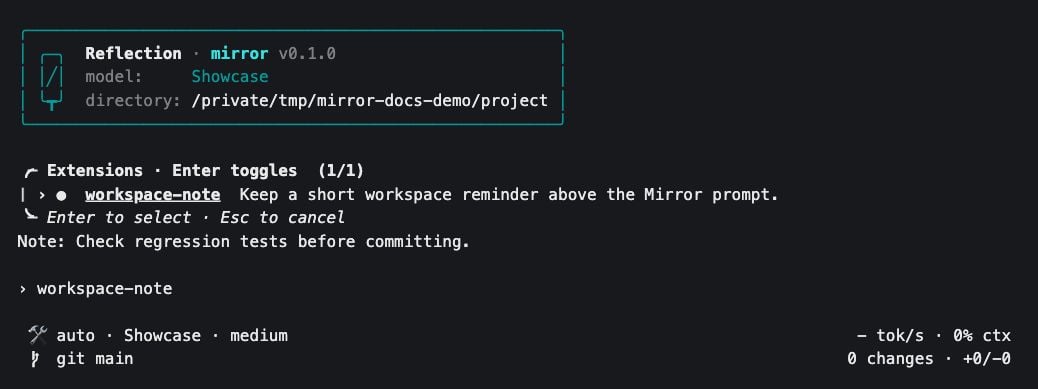
The picker filtered to the custom workspace-note extension used below. A filled circle marks it as enabled.
~/.mirror/config.json:
- Bundled entries use keys such as
builtin/editor. - External entries use the resolved absolute path to their
extension.pyfile. - Moving an external extension can trigger a new trust decision.
Bundled extensions
These names appear in the picker:- For command arguments, see the CLI reference.
- For server configuration, see MCP servers.
Install an external extension
An external extension is a directory with anextension.py file. Choose a location:
- Outside a repository, Mirror checks the launch directory for project extensions.
- Discovery uses the launch directory. Switching workspaces does not scan a new directory for additional extensions.
- Add the
extension.pyfile in one of these locations. - Start Mirror.
- Review the code and select Enable if you trust it.
- Use
/extensionsto change the decision later. - After editing Python source, toggle the extension off and on, or restart Mirror.
- Saving the file alone does not reload its code.
mirror --trust-extensions:
- Newly discovered external extensions are enabled without the consent prompt.
- Existing disabled choices are preserved.
Example: a workspace reminder
This extension adds/note and shows its text above the prompt. It performs no file, network, or model operations.
Create the directory in your project:
.mirror/extensions/workspace-note/extension.py:
- Start Mirror.
-
Enable
workspace-notewhen prompted. -
Set a reminder with
/note:
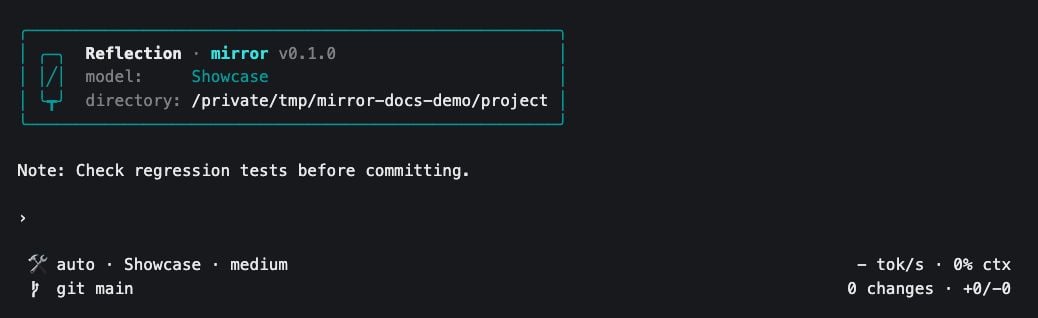
The example extension renders a reminder above Mirror's prompt in a demonstration project.
The text belongs to the workspace’s current session. This example does not save reminders to disk.
How the example works
slash_commands()registers the command. Its handler returns aRoutedExtensionActioncontaining the text.reduce()applies that action to this workspace’s extension state.render()draws the resulting reminder above the prompt.
- Keep
id()stable and unique. - Define one concrete
Extensionsubclass in the module, with a no-argument constructor. - Set
supports_local = Truefor local workspaces.
Extension API
Start with the reminder example, then add the hooks your extension needs:- Keep file and network operations out of
reduce()andrender(). - Emit an effect and do the work in
handle_effect()so rendering remains responsive.
- Expose a
ToolDefinition. - Implement
async execute(arguments: str) -> ToolResult. The argument string contains JSON.
Extensions across workspaces
Store workspace-specific values in extension state, as the reminder example does, rather than on the shared Python object.
Ask Mirror to create an extension
Enable the bundleduser_extensions entry in /extensions to let the agent author and manage global user extensions. It exposes the user-extensions__extensions tool with these actions:
For example:
- Review the generated code before asking Mirror to load it.
createonly writes the scaffold. Loading is a separate step.- If you want tool-call review while the agent works, choose manual approval with
/permissions.
Troubleshoot an extension
Remove API keys and private code before sharing logs. See reporting a bug.